thatmike1 / share

Before and after

Three weekend apps, reworked.

Over a weekend I had GPT build three small apps for myself through Codex. They ran, but using them was hard work. On 6 October Claude reworked all three.

These are screenshots of the real code at each point, checked out from git history and run on 7 October. Nothing was mocked up or redrawn. Click or tap any screenshot to see it at full size; in the viewer, the arrow keys or a swipe flip between before and after.

Before GPT weekend build After Claude rework, 6 Oct
  1. 01 Demand finder
  2. 02 Movie chooser
  3. 03 Photo lab

01 · research tool

Demand finder

Point it at a product idea or a problem space and it looks for evidence that people would pay for it.

The weekend build was a form you filled in by hand. The rework hands the digging to an agent and shows where every lead stands.

Each version shows the evidence that shipped with it, so the data differs as well as the interface.
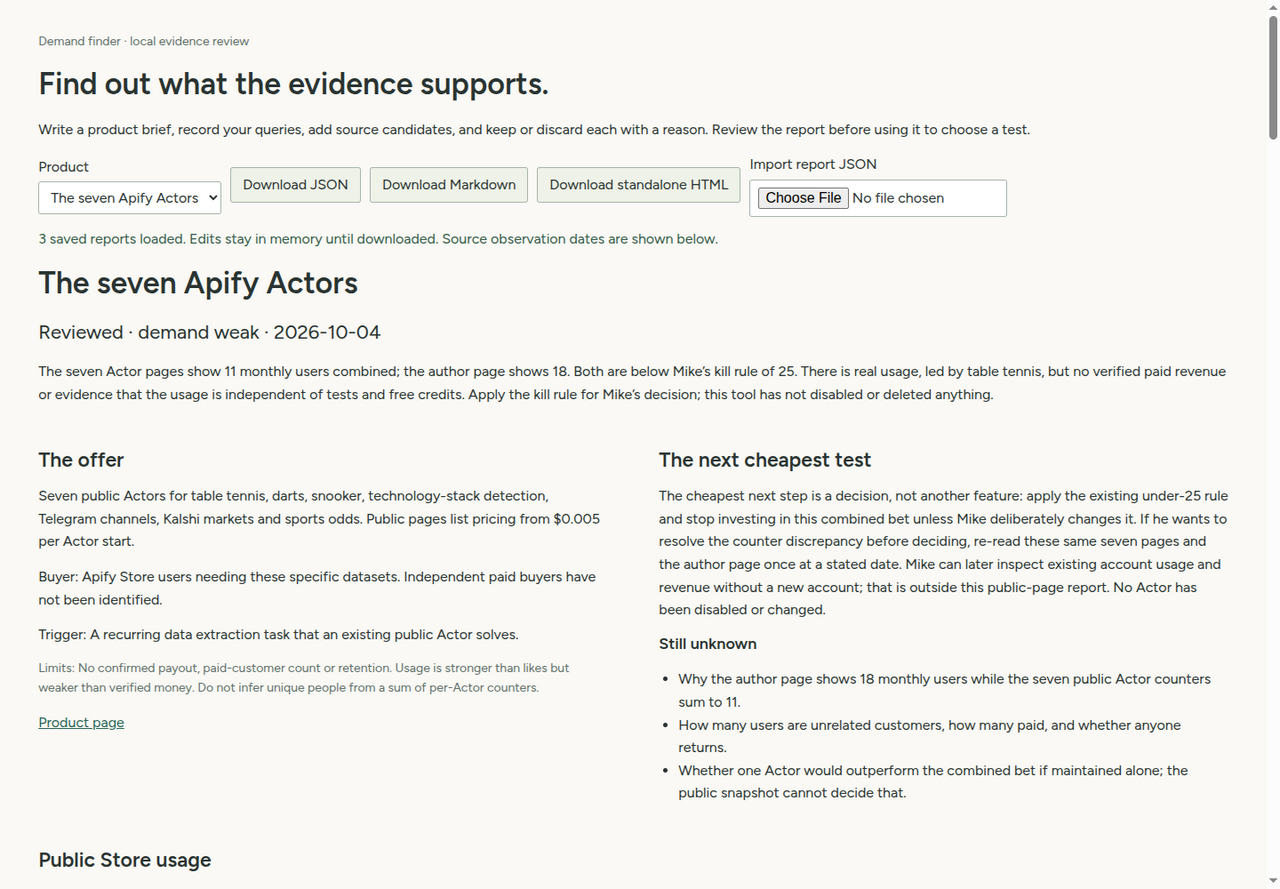
Beforefirst screen
Old demand finder: a product picker, download buttons and a file import above a long written report on the seven Apify Actors. View full size
One long page per product. A product picker, three download buttons and a file import up top, then a written report. Edits stay in memory until you download them.
Afterfirst screen
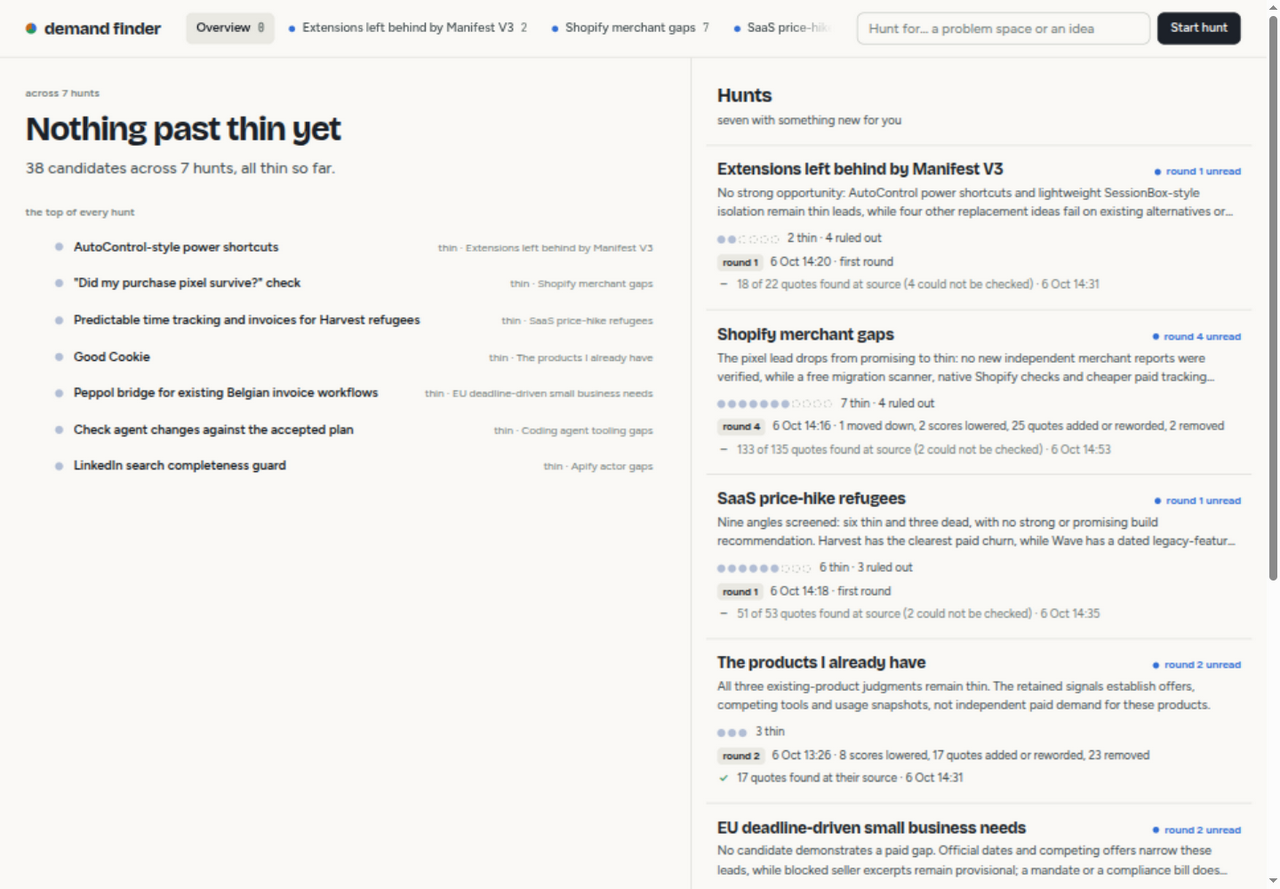
New demand finder overview: the top lead from each of seven hunts on the left, the list of hunts with round status on the right. View full size
An overview across seven hunts. The best lead from each hunt on the left; on the right, each hunt with what changed in its latest round and how many quotes were found at their source. The headline says it straight: nothing past thin yet.

Past the first screen

The old first screen hides how much manual work sat underneath it. The new one keeps the detail one click away.
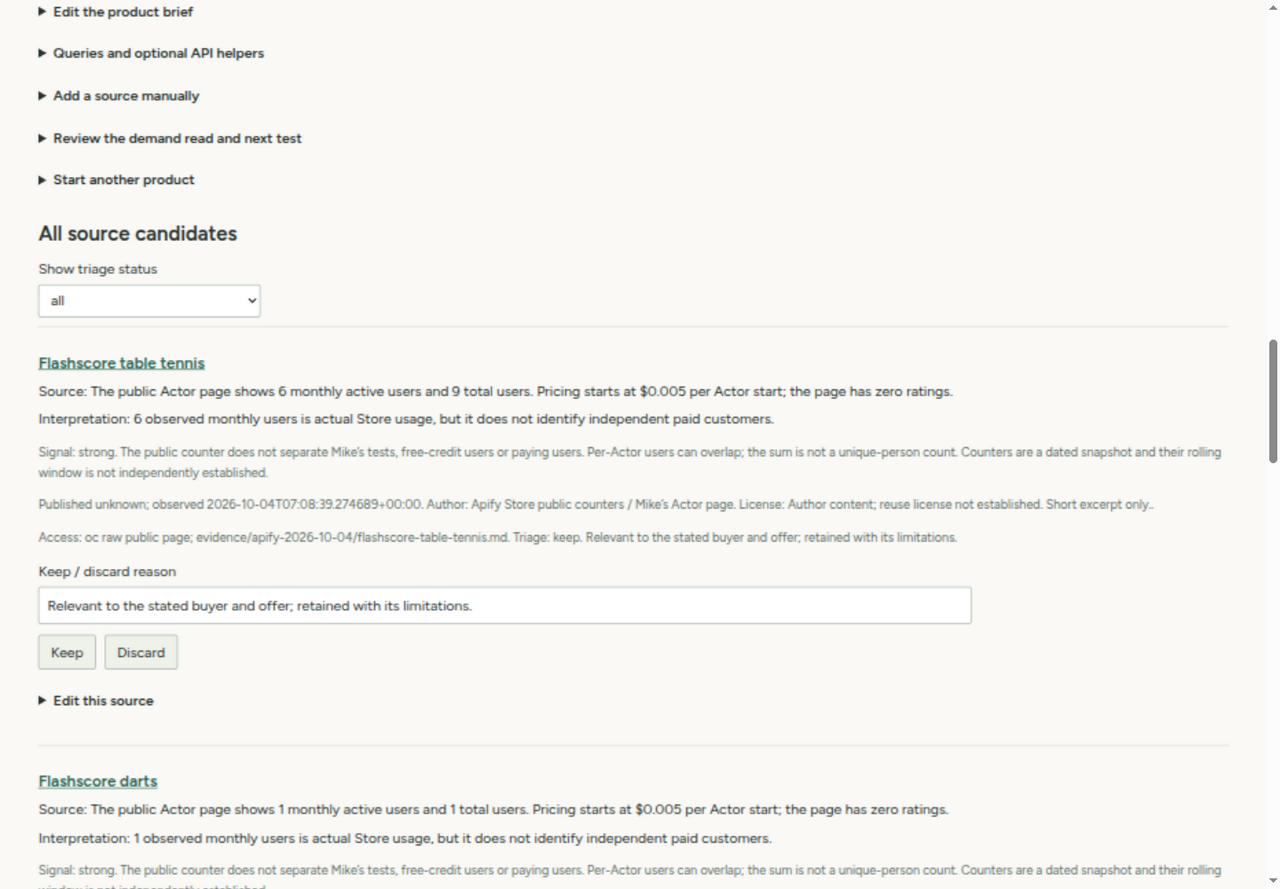
Beforescrolled down
Old demand finder further down: five collapsed sections, then source candidates each with a reason box and Keep and Discard buttons. View full size
Further down the old page. Five collapsed sections (brief, queries, add a source, review, start another product), then every source candidate with its own reason box and Keep and Discard buttons.
Beforeform opened
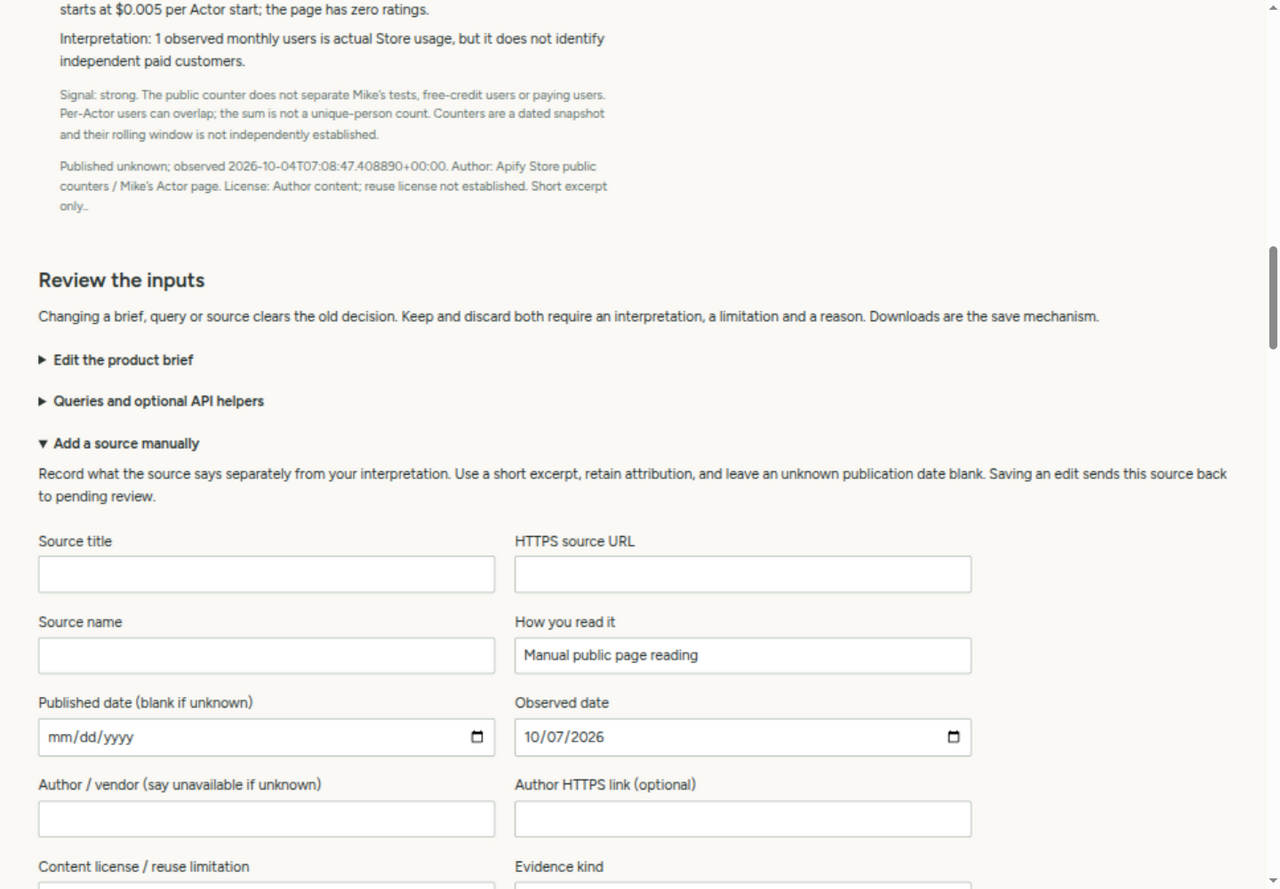
Old demand finder with the Add a source manually section open: a two-column form of empty fields. View full size
Adding one source by hand. Opening “Add a source manually” reveals a two-column form: title, URL, source name, how you read it, published and observed dates, author, license, evidence kind, and more below the fold.
Afterone hunt opened
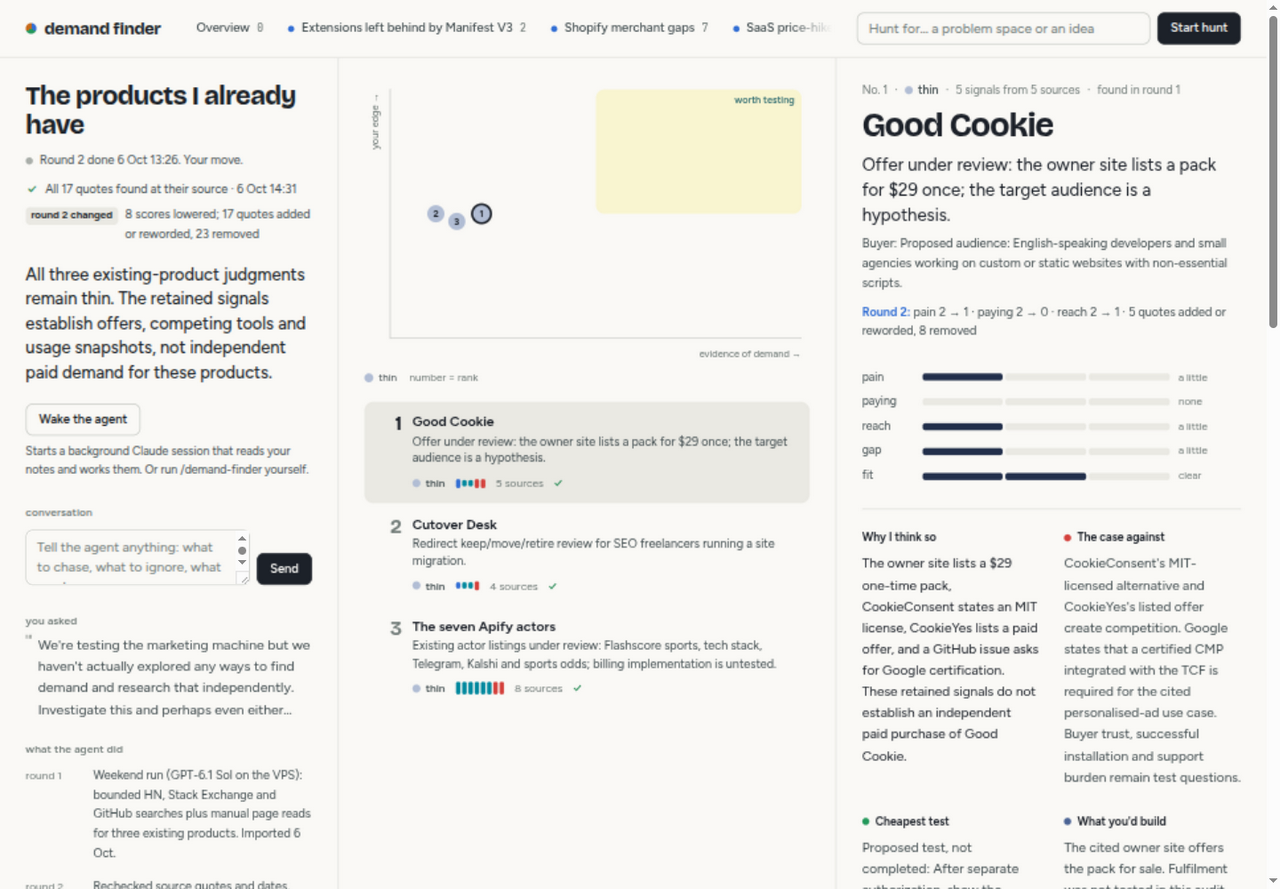
New demand finder inside one hunt: summary and conversation on the left, a chart of leads in the middle, the selected lead's scores and arguments on the right. View full size
Inside one hunt now. The agent's summary and a box to steer it on the left, leads plotted by evidence of demand against your edge in the middle, and the case for and against the selected lead on the right.

02 · movie night

Movie chooser

“Tonight” picks a film for the evening, starting from what we already like.

The old one made you read three dense cards and pick from a wall of buttons. The new one leads with posters and gives each film one obvious action.

Both start from an empty ratings history with live TMDB data. They suggest different films because each version's own logic picked them.
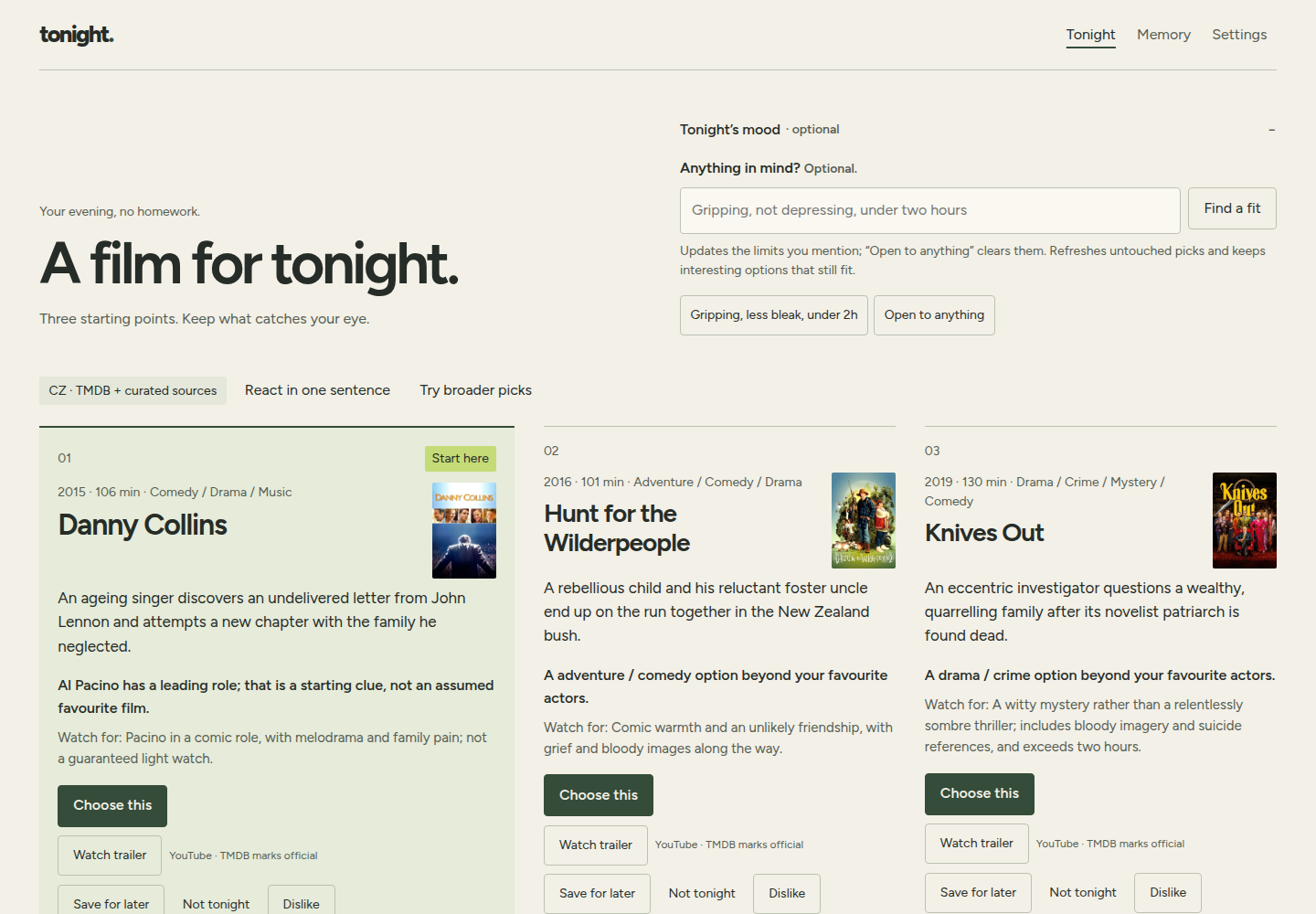
Beforefirst screen
Old movie chooser: a large headline, a mood text box, and three text-heavy film cards with small posters and many buttons. View full size
Three starting points, lots of reading. A free-text mood box, then three cards, each with a synopsis, a reason, a content note and five buttons: Choose this, Watch trailer, Save for later, Not tonight, Dislike.
Afterfirst screen
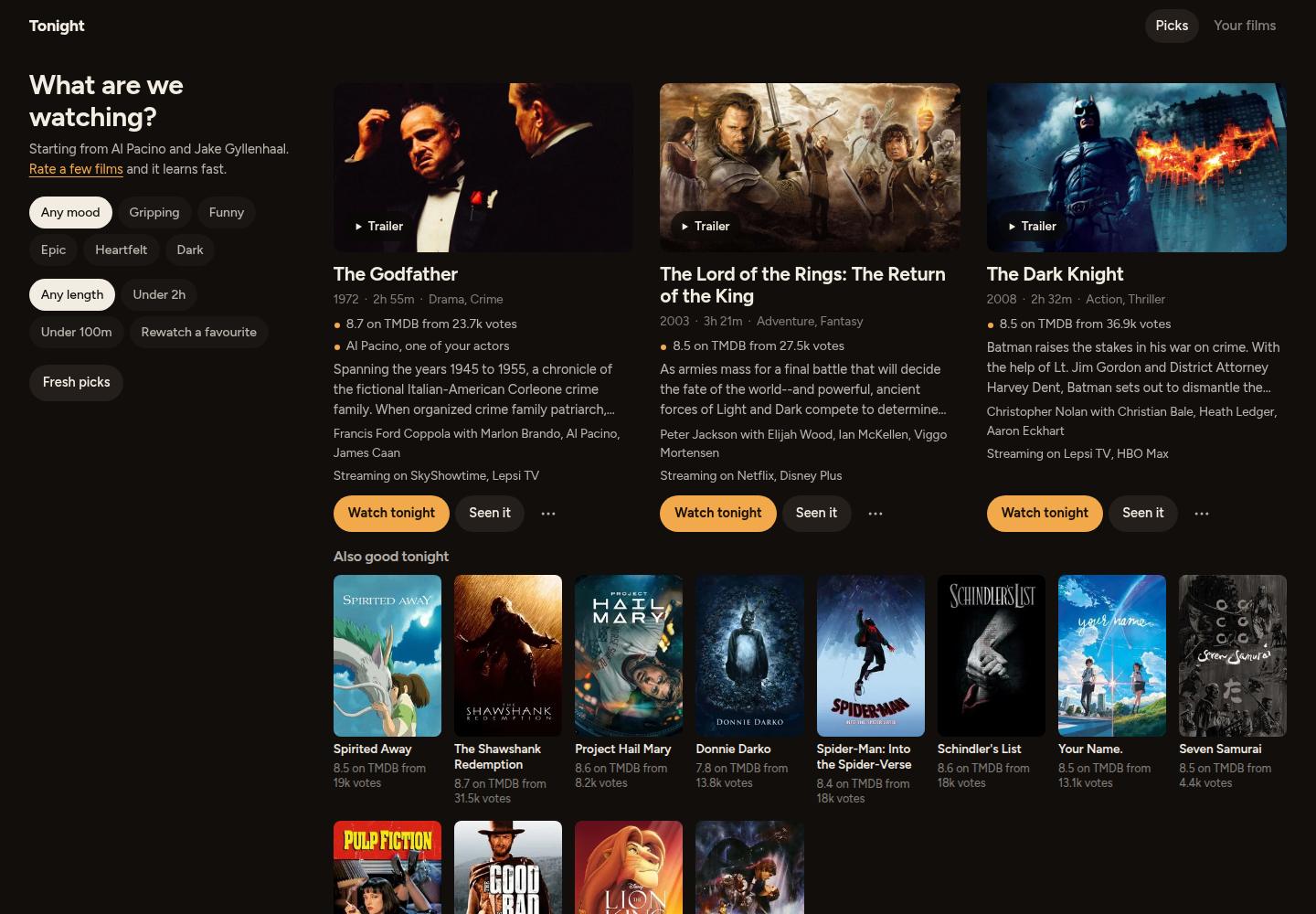
New movie chooser on a dark background: mood and length chips on the left, three large film stills with trailers and a Watch tonight button, a row of posters below. View full size
Posters first. Mood and length are chips. Each pick shows its rating, cast and where it streams, with one main action, Watch tonight. More options sit in a row below.

03 · photo editor

Photo lab

A film-look editor that runs in the browser.

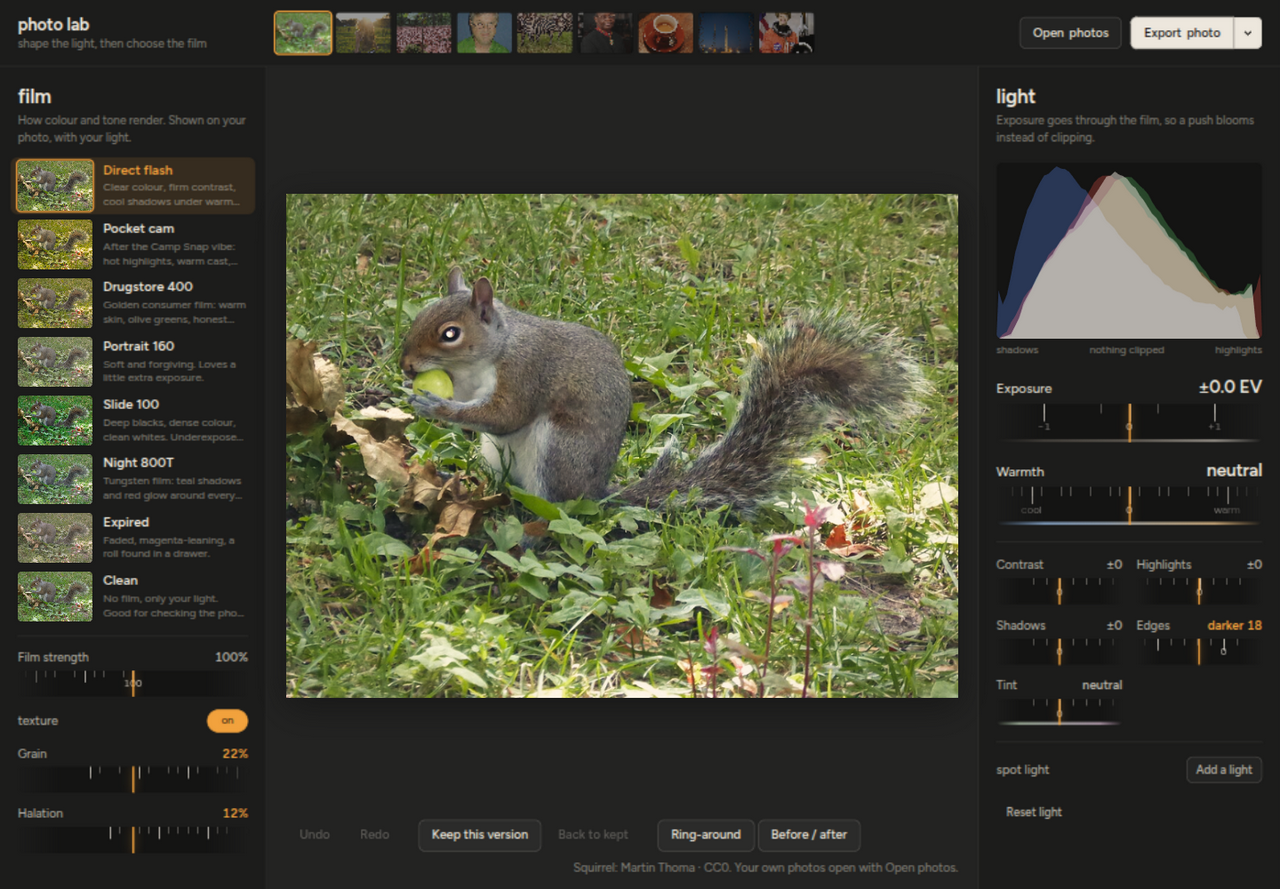
The weekend build tucked its controls into a sidebar. The rework puts the photo in the middle, film stocks on one side and the light on the other.

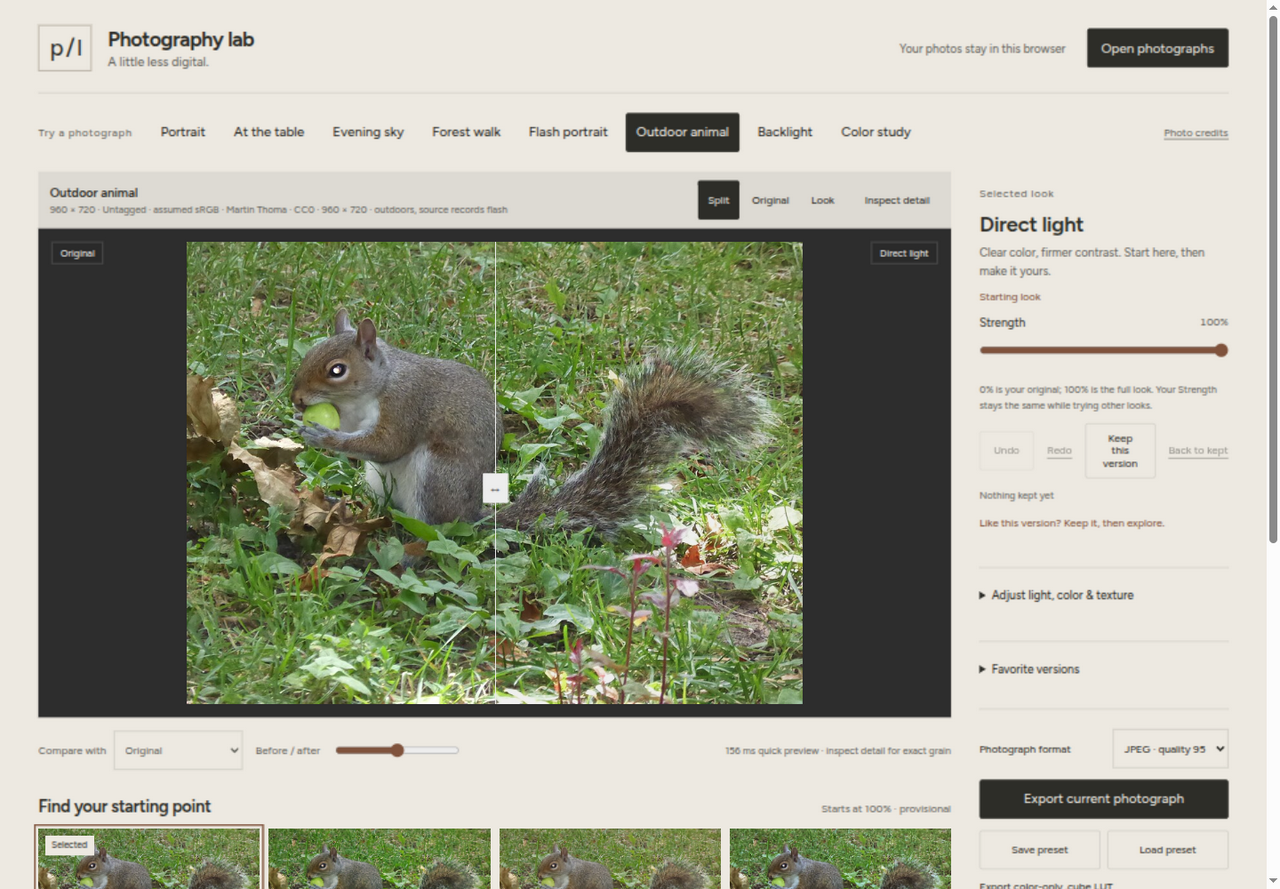
Same squirrel photo in both (Martin Thoma, CC0). The old version opens in a split view against the original; the new one shows the developed photo.
Beforefirst screen
Old photo lab: sample photo tabs, a split view of a squirrel photo, and a sidebar with a strength slider and collapsed sections. View full size
Looks as presets with a strength slider. A split view of the original against the look, a sidebar with Undo, Redo and Keep this version, and the actual adjustments folded under “Adjust light, color & texture”.
Afterfirst screen
New photo lab on a dark background: film stocks listed on the left, the squirrel photo in the middle, a histogram and light dials on the right. View full size
Film on the left, light on the right. Eight film stocks previewed on your own photo, a histogram that reports clipping, and dials for exposure, warmth and tone. Ring-around and before/after sit under the photo.

Past the first screen

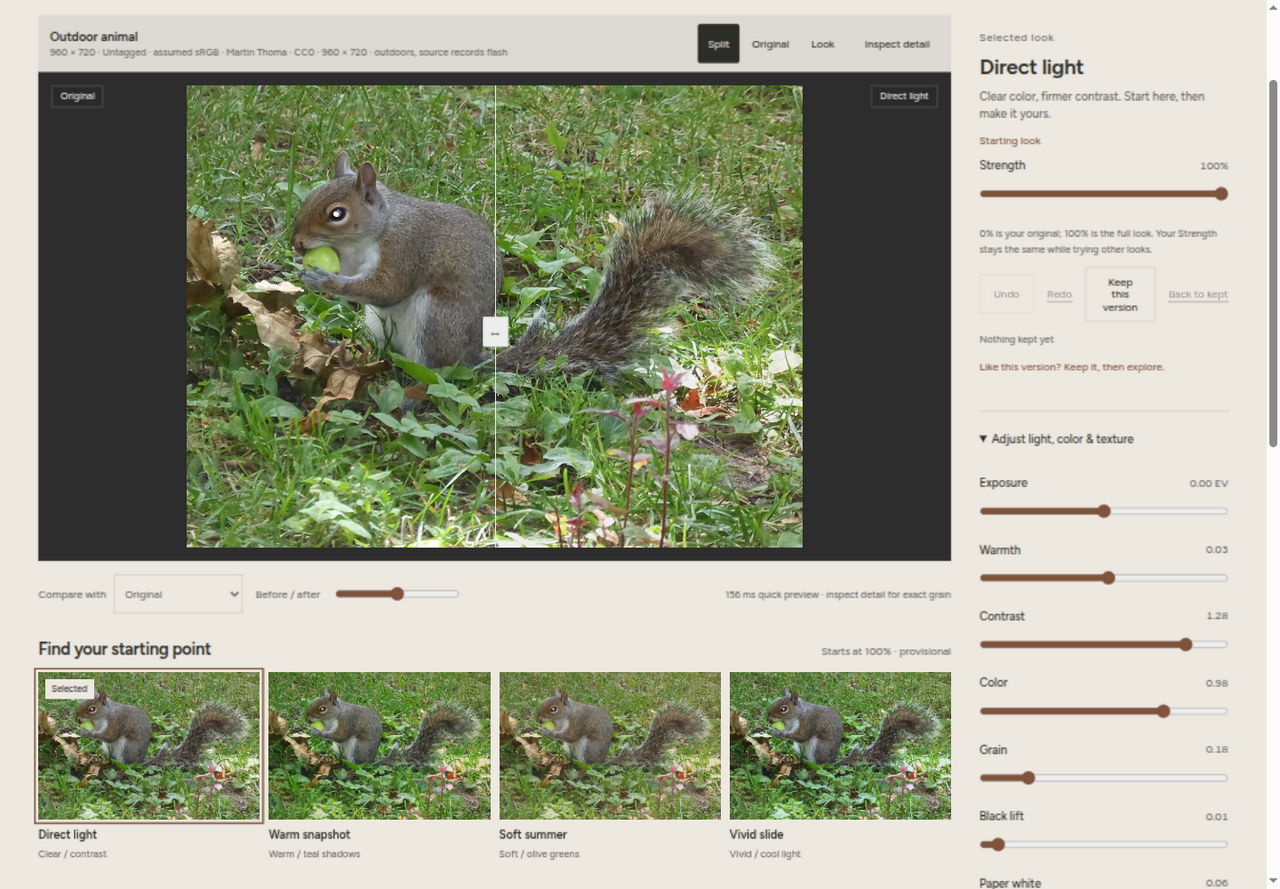
Where the old version kept the real editing.
Beforecontrols opened
Old photo lab with Adjust light, color and texture expanded: a long column of sliders in the sidebar. View full size
The old controls, opened. Expanding the section stacks one slider per setting (exposure, warmth, contrast, color, grain, black lift, paper white) down the sidebar, running past the bottom of the window.

Provenance

How these were captured

Every before screenshot runs the old code, checked out from git history. Every after screenshot runs the code on main as of 7 October. All were taken in a 1440 by 1000 pixel browser window; the demand finder and photo lab images were saved at 1280 by 889, the movie chooser ones at 1440 by 1000, so each pair matches.

The page shows compressed copies. The viewer's “Open original” link gives the untouched PNG.

Demand finder
Before: 9b6ba905, the version just before the agent-first rewrite. After: main, including the overview from 27c0cbb2.
Movie chooser
Before: the weekend branch at 504a484d. After: the rewrite from 16202940.
Photo lab
Before: the weekend branch at aa1dded4. After: the rebuild from a6e6e8a9, plus raw-file support added since.
Main at capture
e62cf206